
Free Chess 2.1.1
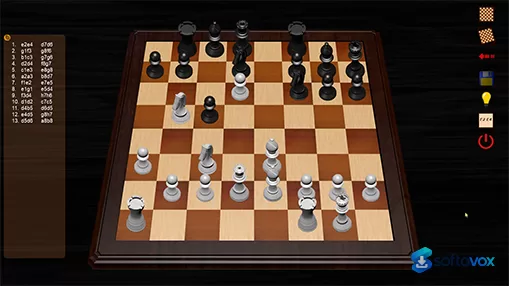
Free Chess is a lightweight, completely free chess program for Windows that focuses on simplicity and clean gameplay. It offers smart move checking, ten adjustable difficulty levels, online play support, and runs on everything from Windows XP to Windows 11 with a tiny 8.8 MB installer. There are no ads, no account requirements, and no time limits, just straightforward chess at your own pace. It's perfect for casual players and beginners who want a no-fuss way to enjoy the game without the complexity of training-focused alternatives like Lucas Chess or the clunky interfaces of older programs like Arena.
- Free
- Windows
- Nov 5, 2026
Screenshots
About Free Chess
Pardolabs Download, Free Chess, Backgammon & RPG Soundscapes
TL;DR Quick Take / Who is this for?
Pardolabs is not a single application but a small independent workshop run by developer Jorge Pardo Serrano, who has been publishing free games and tools since 2001. The current catalogue includes three shipped projects and one in development: Free Chess, a 3D chess game powered by the Stockfish engine with ten difficulty levels; Free Backgammon, a classic board game with three difficulty levels and multi-core processor support; and Dice & Sound, an Android soundscape manager for tabletop RPG game masters that is listed as coming soon to Google Play. Everything on the site is free, ad-free, and built without a monetisation layer, which is increasingly rare for software of any kind. The trade-off is scope and polish. These are solo-developer projects rather than commercial products, the interfaces are functional rather than modern, and the board games are Windows-only. Customer support is effectively an email address, not a ticketing system. Pardolabs is the right pick for casual players who want a lightweight chess or backgammon opponent without ads or accounts, and for tabletop game masters curious about a purpose-built soundscape tool. It is not the right choice for anyone expecting advanced chess analysis features, mobile versions of the board games, or the kind of support a commercial studio provides.
Quick Info Box
| License Type | Freeware (no ads, no in-app purchases) |
|---|---|
| File Size | Approx. 8–9 MB per board game; Dice & Sound size not yet published |
| OS Compatibility | Windows (Free Chess, Free Backgammon); Android (Dice & Sound, coming soon) |
| Latest Version | Free Chess 2.1.1; Free Backgammon 1.0.1; Dice & Sound pre-release |
| Developer | Jorge Pardo Serrano (Pardolabs) |
Key Features & Real-World Usability
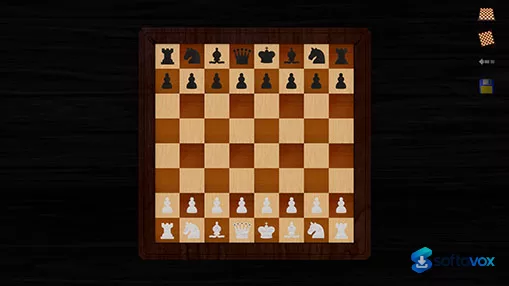
Pardolabs’ products share a design philosophy: keep the software small, keep it free, and keep it focused on the core activity. Free Chess is the most developed of the three. It presents a classic 3D board, lets you choose which side to play before the game begins, and offers ten difficulty levels driven by the open-source Stockfish engine, which supports multi-core processors and is widely regarded as one of the strongest chess engines available. The interface is deliberately simple, and the game sets up quickly without requiring an account or an internet connection. Free Backgammon follows the same pattern: a 3D board, three difficulty levels, and multi-core support, with the standard rules of backgammon implemented. It is a straightforward opponent for casual play rather than a full backgammon suite with analysis, match play, or online multiplayer. Dice & Sound is the newest project and the most ambitious in concept. It is aimed at tabletop RPG game masters and organises audio into three layers: an atmosphere track that follows the emotional tone of a scene, ambient layers such as rain or wind that you can fade in and out, and one-shot event sounds like thunder or sword clashes that you trigger on cue. The Fantasy world ships with 171 music tracks, more than 200 sound effects, and 20 atmospheres, and you can save any combination as a preset and group presets by campaign session. Additional worlds, including Science Fiction and Cosmic Horror, are listed as coming soon. The limitations are those of any solo-developed project. The board games do not include move history export, engine analysis panels, online play, or mobile versions. Dice & Sound is not yet publicly released, and its Android launch date has not been confirmed. Documentation is minimal, and there is no in-app help beyond the basic interface.
- Free Chess with Stockfish: Ten difficulty levels powered by the open-source Stockfish engine, with multi-core processor support and a classic 3D board.
- Free Backgammon: Three difficulty levels, 3D graphics, and multi-core support for a lightweight backgammon opponent.
- Dice & Sound for tabletop RPGs: Layered atmosphere music, ambient effects, and one-shot event sounds designed for game masters running sessions.
- Large Fantasy content library: 171 music tracks, more than 200 sound effects, and 20 atmospheres included in the Fantasy world at launch.
- Preset scenes: Save any combination of music and effects as a preset, group presets by campaign session, and recall a scene instantly.
- Completely free and ad-free: No advertising, no accounts, no in-app purchases, and no telemetry requirements for basic use.
- Lightweight installs: The board games weigh in at roughly 8–9 MB, making them practical on older or low-storage machines.
Pros, Cons & Community/User Feedback
User feedback for Pardolabs is sparse because the projects are small and independently published, but the available reviews and descriptions are consistent. For Free Chess, Softonic’s German-language review describes it as a reasonable chess simulator suitable for both beginners and experienced players, praising the simple installation and the ability to choose sides and difficulty before starting. The same review notes two practical drawbacks: the program is not available in German, and it displays incorrectly on small screens. CNET’s listing recommends Free Chess for anyone who wants steady practice without clutter, noting that it sets up quickly, plays smoothly, and makes it easy to run focused sessions that build calculation and endgame discipline. FileHorse’s Spanish review concludes that it is a simple but well-designed application that provides an enjoyable chess experience on Windows, and highlights the ten difficulty levels as a strength. For Free Backgammon, coverage is thinner. Softdeluxe confirms that the downloadable file is the original, unmodified package from pardolabs.com, which matters for safety, and Podnova’s listing notes the 3D HD graphics, three difficulty levels, and multi-core processor support. Dice & Sound has no published user reviews yet because it has not launched on Google Play. The developer’s site describes it as “coming soon,” and the feature list is detailed, but there is no independent feedback on whether the atmosphere-switching and preset system work smoothly in a live session. Across the catalogue, the positives are consistent: free, ad-free, lightweight, and focused on the core activity. The negatives are equally consistent: dated presentation, limited feature depth, no customer support infrastructure beyond email, and for the board games, Windows-only availability.
Pros
- Completely free with no ads, accounts, or in-app purchases
- Free Chess uses the strong Stockfish engine with ten difficulty levels
- Lightweight installs (roughly 8–9 MB) suitable for older hardware
- Simple setup and a focus on the core game or task, without clutter
- Dice & Sound offers a large Fantasy library and a practical preset system for game masters
- Original, unmodified downloads available directly from the developer
- No telemetry or account requirements for basic use
Cons
- Board games are Windows-only; no macOS, Linux, or mobile versions
- Interface presentation is dated and shows display problems on small screens
- No advanced chess features such as analysis panels, move export, or online play
- Free Backgammon is basic, with no match play or analysis tools
- Dice & Sound is not yet publicly released; launch date unconfirmed
- Customer support is limited to a single email address
- Minimal documentation and no in-app tutorials
- Solo-developer project with no guarantee of future updates
Final Verdict & Safe Download Advice
Pardolabs is best understood as a personal workshop rather than a software company, and judging its products by commercial standards misses the point. Free Chess is a genuinely useful practice tool: the Stockfish engine gives it real strength, the ten difficulty levels cover a wide range of players, and the absence of ads or accounts makes it easy to recommend to anyone who wants a straightforward chess opponent on Windows. Free Backgammon is a smaller offering, but it does the basics correctly and costs nothing. Dice & Sound is the most interesting project on the site, and if you run tabletop RPG sessions, the layered audio system and preset workflow are exactly the kind of features a game master needs. The caveat is that it has not launched yet, so the concept is promising but unproven. Across all three, the trade-offs are the same: free and ad-free, but limited in polish, depth, and platform coverage. If you want a lightweight, no-strings board game or you are curious about a purpose-built RPG soundscape tool, Pardolabs is worth a look. If you need advanced features, mobile support, or responsive customer service, look elsewhere.
- Download only from pardolabs.com: The developer distributes the installers directly from the official site. Third-party download portals may repackage the installers, and Softdeluxe specifically notes that the Free Backgammon file it offers is the original, unmodified package from pardolabs.com, use that as the standard for any download you accept.
- Verify the file size and version: Free Chess is approximately 8.8 MB at version 2.1.1, and Free Backgammon is version 1.0.1 at a similar size. A dramatically larger file or an older version number is a warning sign.
- Check system compatibility before installing: The board games are Windows applications, and older reviews note that they display incorrectly on small screens. If you are running a high-DPI or unusually small display, test the game window behaviour before relying on it.
- Do not expect a commercial support channel: The only contact listed on the site is the developer’s email address. If you need a guaranteed response or a formal support process, this is not the right source.
- Treat Dice & Sound as pre-release: The Android app is listed as “coming soon,” and no public build is available yet. Do not download unofficial APK files claiming to be Dice & Sound from third-party sites; wait for the Google Play release.
- Keep expectations aligned with the project’s scope: These are solo-developed, free tools. They are safe and ad-free when obtained from the official site, but they are not feature-complete competitors to commercial chess or backgammon software.
Similar software



Frequently asked questions about Free Chess
Is Free Chess safe to download?
Is Free Chess really free?
What Windows versions does Free Chess run on?
What is Free Chess used for?
How is Free Chess different from Lucas Chess or Arena?
How hard is the computer opponent in Free Chess?
Versions
| Version | Release date | Platform | File size | |
|---|---|---|---|---|
| Free Chess 2.1.1 Latest version | Dec 23, 2024 | Windows | 8.8 MB | Download |
Comments about Free Chess
No comments yet. Share your experience with this program!